Gmail AI Overviews vs Google Search for SEO Teams
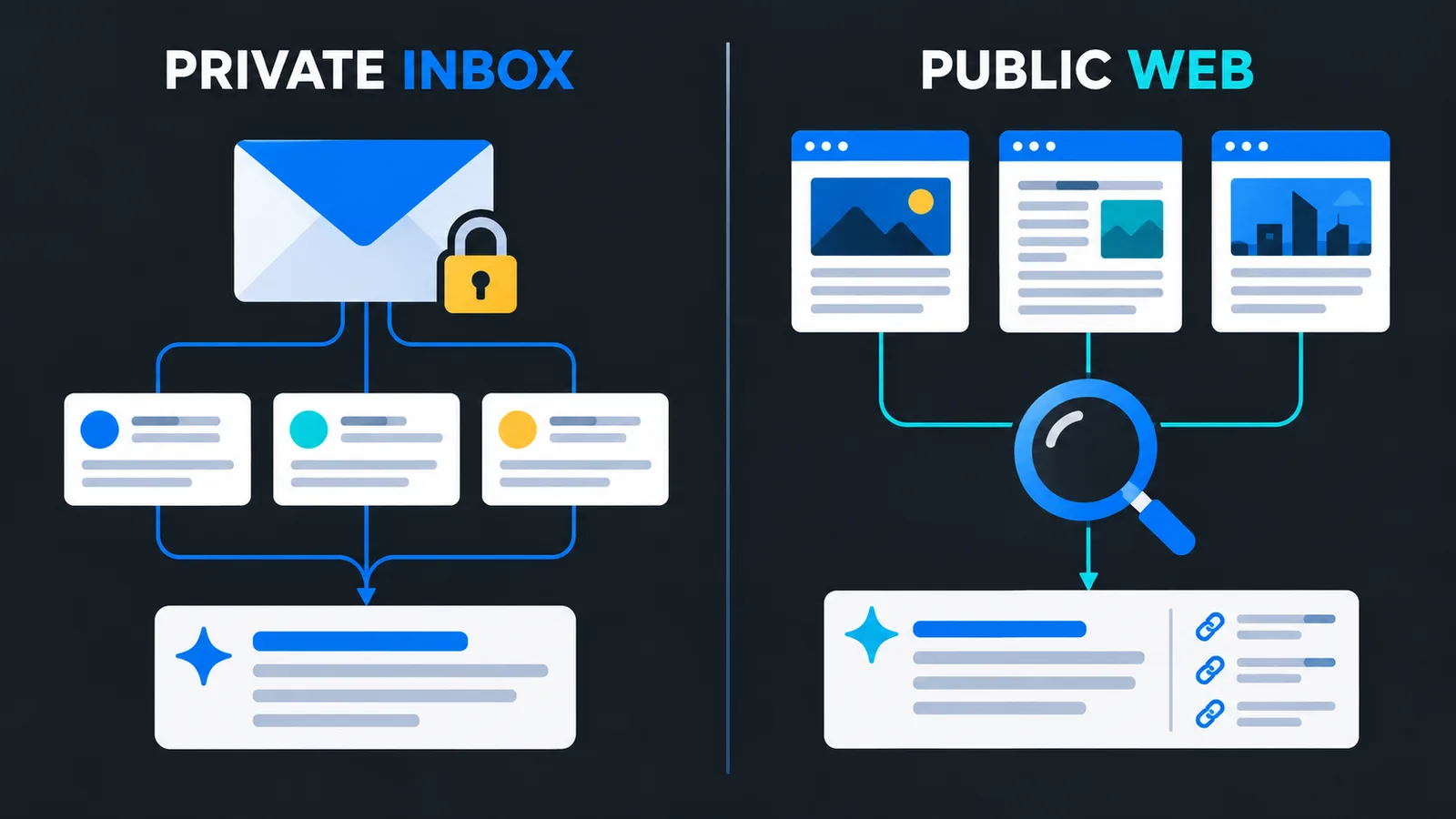
Gmail AI Overviews answer questions using relevant messages in a user's inbox. They are not the public AI Overviews displayed in Google Search. For SEO teams, the practical response is to separate private email retrieval from organic web visibility, improve the clarity of customer communications, and measure each journey with appropriate evidence.
What changed with Gmail AI Overviews in September 2026?
Google announced wider availability of AI Overviews in Gmail search on September 15, with the Scheduled Release rollout starting September 21 and an indicated visibility window of one to three days. The expansion concerns eligible paid accounts using English, with regional restrictions for personal accounts. It is not a new public search ranking system. Google Workspace's rollout announcement.
As checked on September 22, this is an ongoing rollout, not confirmation that every account has access. Teams should verify their edition, settings, and actual interface before planning around the feature.
The important marketing question is not whether another product now uses AI. It is whether that product discovers public information, retrieves information already available to a specific person, or sends a measurable visitor to a website. Those are different business events, and they need different evidence.
How are Gmail answers different from Google Search answers?
Gmail search retrieves relevant emails and uses their contents to construct an answer. Google's help documentation describes natural-language questions and answers that combine information from messages. A query with search operators such as from: does not produce this Gmail overview. How Gmail search AI Overviews work.
By contrast, Google's website guidance describes AI Overviews and AI Mode in Search as experiences that can surface supporting web links. A page must be indexed and eligible for a Search snippet to qualify; qualification does not guarantee selection. Google's guidance for website owners.
Use this operational distinction when reviewing a screenshot or a performance claim:
| Question | Private inbox retrieval | Public web search |
|---|---|---|
| What is the immediate source? | Messages accessible in the account | Search results and supporting web pages |
| What does a brand appearance establish? | The brand appeared in that person's retrieved material | The brand appeared in the observed search answer |
| What should be measured? | An authorized task test and any attributable next action | Search exposure, observed citations, visits, and conversions |
| What should not be inferred? | Public organic ranking | Every user's answer or a guaranteed sale |
This table is a reporting framework, not a claim that GEOCARA can inspect private inboxes. Our AI visibility and mention-tracking guide explains why an observed mention, a citation, and a visit should already be separate metrics.
Does this rollout create a new Gmail SEO ranking opportunity?
Treating private inbox retrieval as a public acquisition channel is the wrong starting assumption. A customer recovering a renewal date from an email is completing a task after a relationship already exists. That can be commercially valuable, but it is not the same as an unknown buyer discovering your company through a category search.
Our recommendation is to manage two workstreams. The SEO owner maintains useful public pages and checks search performance. The lifecycle or customer-success owner maintains accurate messages and evaluates whether customers can recover the information they need. Both teams should use the same approved product facts.
For public Search, Google says established SEO fundamentals remain relevant and no special AI files or additional schema are required for inclusion. Continue reviewing crawl access, internal linking, visible text, and accurate structured data. Search AI feature requirements. Our Google AI Overviews guide covers that separate public-search workstream.
Do not turn the Gmail announcement into a reason to send unsolicited messages, repeat keywords, or promise a placement in someone's answer. Clear communication is a service-quality improvement; a guaranteed Gmail ranking package would require evidence this announcement does not provide.
What should a business improve in customer emails?
Start with important messages that recipients genuinely need: confirmations, onboarding instructions, renewal notices, support resolutions, and changes to an agreed service. The following is our editorial checklist, not a published Gmail ranking formula.
- Name the subject precisely. Identify the product, plan, booking, or service the message concerns instead of relying on a vague opening such as "Your update."
- State the essential fact directly. Put the confirmed date, action, or status in readable text rather than only inside an image.
- Separate facts from conditions. Distinguish what has happened, what is scheduled, and what depends on the recipient's next action.
- Resolve date ambiguity. Include the year and relevant timezone for appointments or deadlines. Specify currency and billing period when a price is necessary.
- Make corrections explicit. If a later message replaces an earlier date or instruction, say which earlier information is no longer valid.
- Link to the authoritative destination. Use the appropriate account page or public documentation, without exposing private account details in a public link.
Consider an illustrative training business. "Your session is soon" forces the recipient to reconstruct the details. "Your remote team training is confirmed for 12 October 2026, 10:00 Europe/Paris; joining instructions are in your account" is easier to interpret and verify. This example is invented to demonstrate clarity, not a measured retrieval result.
Also review the email's delivery foundations. Gmail's sender guidelines distinguish requirements for all senders from additional requirements for bulk senders, including authentication and unsubscribe provisions. Consult the category that actually applies to your sending volume. Gmail email sender guidelines. Deliverability hygiene is not proof of AI answer selection.
How can you test the experience without exposing customer data?
Use an authorized test account and synthetic messages, not a customer's mailbox. A small, controlled task set is more informative than a collection of impressive screenshots whose source material is unknown.
Create a test record for each task: the question, expected fact, source message, observation time, account eligibility, and whether an overview appeared. Include one straightforward confirmation, one correction to a previous date, and one case where the necessary information is deliberately absent.
Ask ordinary questions matching the task, such as "When is my next training session?" Compare the answer with the original messages. Record whether the essential fact is correct, whether a condition was lost, and whether the result provides enough context to avoid a mistaken action.
If the feature is unavailable, record not observed, not incorrect answer. Google's help page still describes gradual availability and requires the relevant smart-feature settings. Gmail availability and settings.
Keep failures as well as successes. One successful response does not establish a stable improvement, and a small internal test does not represent every customer's inbox. When comparing message versions, keep the test question and source facts equivalent, and document any change in account configuration.
Do not publish private message bodies, recipient addresses, account screenshots, or authentication information. Store only the minimum evidence needed for the test. This workflow evaluates the communications your team controls; it does not authorize access to anyone else's personal data.
How should analytics separate email traffic from AI visibility?
Attribute an observed website visit using the evidence available in that session. Do not label every visit from a Gmail user as AI traffic, and do not infer that a recipient saw an overview merely because they clicked a message link.
For campaign links your business controls, Google Analytics supports campaign parameters such as utm_source, utm_medium, and utm_campaign; these values can be inspected in traffic acquisition reporting. Google's campaign URL documentation.
An internal naming example is source customer_newsletter, medium email, and campaign onboarding_sep2026. Use consistent values, verify that redirects preserve them, and test the final destination. These tags identify the campaign you created; they do not prove which Gmail interface element led to the click.
For conversion measurement, define completed outcomes. A submitted demo request, verified account, or completed first audit is more meaningful than a button click that might fail. Deduplicate repeated callbacks and exclude identifiable internal tests from commercial totals.
When attribution is missing, retain an unknown category. Do not allocate unattributed conversions to Gmail AI, ChatGPT, or organic Search simply because those products were recently in the news. Never put email addresses, message contents, or secret links into campaign parameters.
What should an agency include in the next client report?
Add a short scope statement before the numbers: public search visibility and private account retrieval are not interchangeable. Then show the available evidence in separate rows, using the same reporting period.
For public discovery, show observed mentions and citations with the monitored prompt count, plus the search and website metrics your connected sources actually provide. For email, show attributable website sessions and verified outcomes where collection is working. For internal retrieval tests, show tasks evaluated and documented issues, clearly labeled as test results.
Do not add these rows into a single reach total. The populations overlap, the units differ, and some observations are not people at all. A citation test is not an impression count, and an email delivery is not a website session.
Use our agency GEO reporting framework for the wider report. This update adds a boundary to that framework: name the surface, state the source material, and identify what the evidence can actually support.
Frequently asked questions
Are Gmail AI Overviews the same as Google AI Overviews?
No. Gmail's feature works with messages in an account. Google Search AI Overviews belong to the public search experience. Similar names do not make their visibility metrics interchangeable.
Is Gmail's search overview available to everyone?
No. The September rollout applies to eligible paid accounts using English, and restrictions remain for some personal-account regions. Check your account rather than assuming access from the announcement.
Does clearer email wording guarantee an AI mention?
No. The checklist above is a communication-quality recommendation. We have not demonstrated a causal ranking effect or a guaranteed answer placement.
Can analytics prove that an email click came from an overview?
Campaign attribution alone cannot establish that. It can identify a tagged campaign visit, but the specific inbox interaction remains unverified without additional appropriate evidence.
Should a public website checker inspect customer inboxes?
No. A website readiness check and an authorized private-account test have different purposes and access boundaries. Never request mailbox access merely to evaluate a public site's SEO.
Take the next step without mixing the channels
Review one important customer email, test one complete conversion journey, and label the source of each visibility metric. For the public website, run the free AI visibility checker and use the GEO hub to prioritize content and technical improvements. Keep inbox usability, organic discovery, and business outcomes connected in your strategy but separate in your measurement.
Youssef builds GEOCARA and has run visibility probes across AI engines since 2025. He writes from measured probe data, not speculation.
LinkedIn ↗Related GEO guides
Start your free trial
Audit your site and see how AI engines perceive you.